

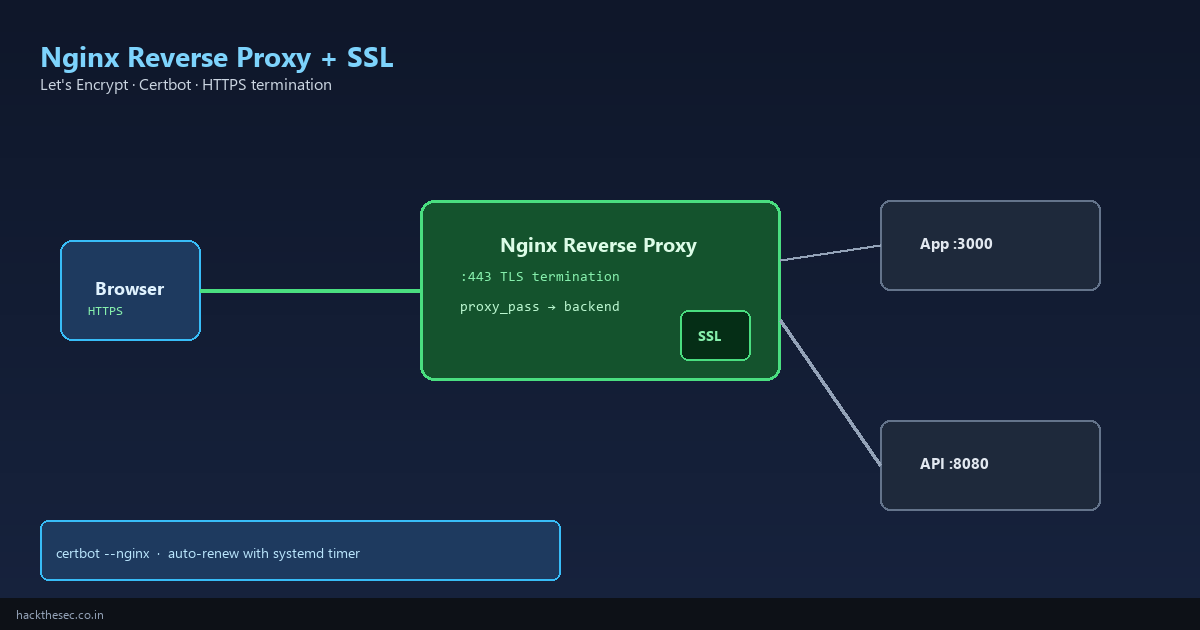
Running multiple web apps on one server — Node.js on port 3000, a Python API on 8080, a static site on 9000 — is normal in production. Exposing every port to the internet is a security mistake. The standard pattern is a single Nginx reverse proxy on ports 80/443 that routes by hostname and terminates TLS.
This guide covers the full workflow: install Nginx, configure virtual hosts, obtain free Let's Encrypt certificates with Certbot, enable HTTP→HTTPS redirects, set security headers, and automate renewal. Tested on Ubuntu 22.04/24.04 and AlmaLinux 9.
Time required: 45–60 minutes. Prerequisites: a domain pointing to your server (A record), ports 80 and 443 open.
Table of contents
- Architecture: why reverse proxy + SSL termination
- Install Nginx
- Backend application (example)
- Reverse proxy server block
- Obtain Let's Encrypt certificate with Certbot
- Force HTTPS and security headers
- Multiple domains and WebSocket proxying
- Certificate auto-renewal
- Troubleshooting and verification
1. Architecture
Internet → Nginx :443 (TLS) → proxy_pass → app :3000 (HTTP, localhost only)
→ Nginx :80 → 301 redirect to HTTPS- One certificate per domain on Nginx — backends stay on HTTP locally
- Firewall: allow 80/443 only; block direct access to app ports
- Certbot validates domain ownership via HTTP-01 challenge on port 80
2. Install Nginx
Ubuntu / Debian:
sudo apt update
sudo apt install -y nginx
sudo systemctl enable --now nginx
sudo nginx -t
curl -I http://localhost
AlmaLinux / Rocky / RHEL:
sudo dnf install -y nginx
sudo systemctl enable --now nginx
sudo firewall-cmd --permanent --add-service=http
sudo firewall-cmd --permanent --add-service=https
sudo firewall-cmd --reload
3. Example backend (Node.js on localhost:3000)
Your app must listen on 127.0.0.1, not 0.0.0.0, when behind Nginx:
# systemd unit /app/server.js binds to localhost
app.listen(3000, '127.0.0.1', () => console.log('API on :3000'));

# Verify backend responds
curl -s http://127.0.0.1:3000/health
4. Reverse proxy server block
Create /etc/nginx/sites-available/app.example.com (Debian) or /etc/nginx/conf.d/app.example.com.conf (RHEL):
server {
    listen 80;
    listen [::]:80;
    server_name app.example.com;

    location / {
        proxy_pass http://127.0.0.1:3000;
        proxy_http_version 1.1;
        proxy_set_header Host $host;
        proxy_set_header X-Real-IP $remote_addr;
        proxy_set_header X-Forwarded-For $proxy_add_x_forwarded_for;
        proxy_set_header X-Forwarded-Proto $scheme;
        proxy_read_timeout 90s;
    }
}
# Debian: enable site
sudo ln -s /etc/nginx/sites-available/app.example.com /etc/nginx/sites-enabled/
sudo nginx -t && sudo systemctl reload nginx5. Let's Encrypt with Certbot
Ubuntu / Debian:
sudo apt install -y certbot python3-certbot-nginx
sudo certbot --nginx -d app.example.com --non-interactive --agree-tos -m admin@example.com

# Certbot edits your server block to add SSL listen 443 ssl;
# Certificate paths:
#   /etc/letsencrypt/live/app.example.com/fullchain.pem
#   /etc/letsencrypt/live/app.example.com/privkey.pem
AlmaLinux / Rocky:
sudo dnf install -y certbot python3-certbot-nginx
sudo certbot --nginx -d app.example.com
After Certbot runs, your config will include something like:
server {
    listen 443 ssl http2;
    listen [::]:443 ssl http2;
    server_name app.example.com;

    ssl_certificate /etc/letsencrypt/live/app.example.com/fullchain.pem;
    ssl_certificate_key /etc/letsencrypt/live/app.example.com/privkey.pem;
    include /etc/letsencrypt/options-ssl-nginx.conf;
    ssl_dhparam /etc/letsencrypt/ssl-dhparams.pem;

    location / {
        proxy_pass http://127.0.0.1:3000;
        # ... proxy headers as above
    }
}
6. Force HTTPS and security headers
Certbot usually adds the port 80 redirect. Verify:
server {
    listen 80;
    server_name app.example.com;
    return 301 https://$host$request_uri;
}
Add security headers inside the server { listen 443 ... } block:
add_header Strict-Transport-Security "max-age=31536000; includeSubDomains" always;
add_header X-Frame-Options "SAMEORIGIN" always;
add_header X-Content-Type-Options "nosniff" always;
add_header Referrer-Policy "strict-origin-when-cross-origin" always;
7. Multiple domains and WebSockets
Second app on api.example.com → port 8080: duplicate server block with different server_name and proxy_pass.
For WebSocket upgrades (Socket.io, Grafana, etc.):
location /ws {
    proxy_pass http://127.0.0.1:3000;
    proxy_http_version 1.1;
    proxy_set_header Upgrade $http_upgrade;
    proxy_set_header Connection "upgrade";
    proxy_set_header Host $host;
}
8. Certificate auto-renewal
# Certbot installs a systemd timer or cron job automatically
sudo systemctl list-timers | grep certbot

# Dry-run renewal test
sudo certbot renew --dry-run

# Manual renewal (if needed)
sudo certbot renew --quiet && sudo systemctl reload nginx
Let's Encrypt certificates expire every 90 days. The timer renews when <30 days remain.
9. Troubleshooting
| Problem | Fix |
|---|---|
| 502 Bad Gateway | Backend not running — curl 127.0.0.1:3000; check SELinux setsebool -P httpd_can_network_connect 1 on RHEL |
| Certbot fails HTTP challenge | DNS A record wrong; port 80 blocked; Cloudflare orange-cloud may need DNS challenge instead |
| Too many redirects | App also redirecting HTTP→HTTPS — disable in app, let Nginx handle it |
| SSL Labs grade B | Use Certbot's options-ssl-nginx.conf; enable HTTP/2 |
# Useful debug commands
sudo nginx -t
sudo tail -f /var/log/nginx/error.log
curl -vI https://app.example.com
openssl s_client -connect app.example.com:443 -servername app.example.com </dev/null 2>/dev/null | openssl x509 -noout -dates
You now have a production-grade Nginx reverse proxy with free auto-renewing TLS. Next hardening steps: rate limiting (limit_req), ModSecurity WAF, and blocking direct IP access in a default server block.