

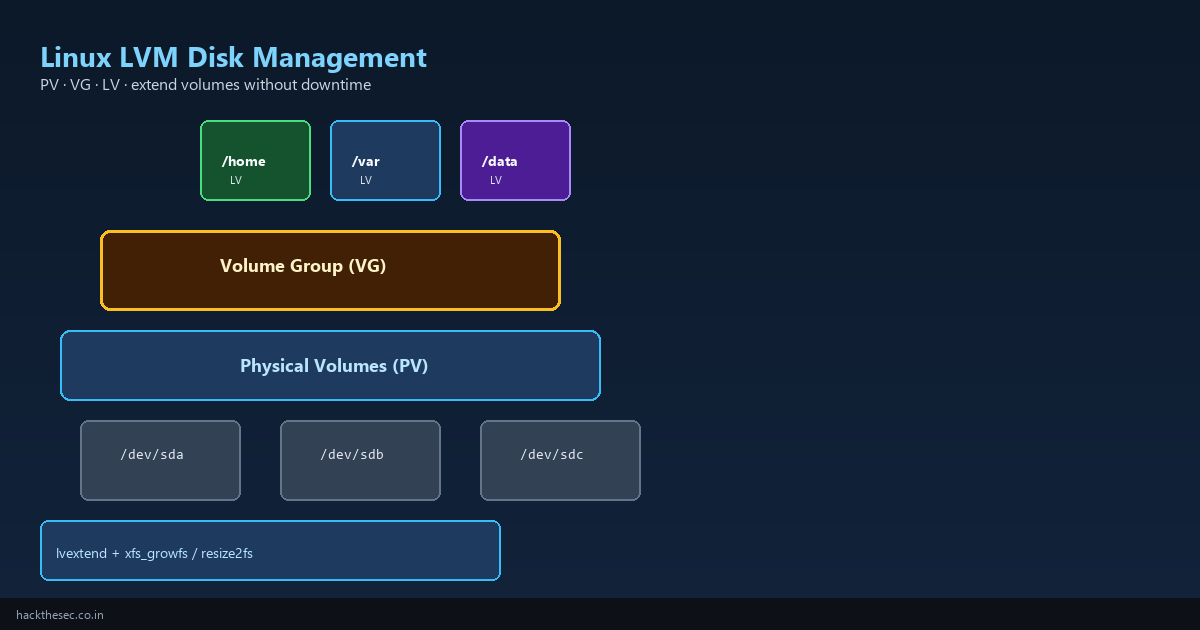
Disk space runs out on production servers — databases grow, logs fill /var, upload directories expand. With LVM (Logical Volume Manager) you add a new disk, extend the volume group, grow the logical volume, and resize the filesystem without reinstalling the OS.
This guide explains PV → VG → LV hierarchy, creates LVM from scratch, extends existing volumes online, snapshots for backups, and covers both XFS and ext4 resize workflows.
Time required: 40–60 minutes. Tested on: Ubuntu 22.04, AlmaLinux 9, Rocky Linux 9.
Table of contents
- LVM concepts: PV, VG, LV
- Inspect current layout
- Create LVM from new disks
- Create filesystem and mount
- Extend a volume group with a new disk
- Grow a logical volume and filesystem
- LVM snapshots for backups
- Remove LVM safely
- Common mistakes
1. LVM concepts
| Layer | Command prefix | What it is |
|---|---|---|
| PV Physical Volume | pv* | A disk or partition prepared for LVM (/dev/sdb, /dev/nvme1n1) |
| VG Volume Group | vg* | Pool of space from one or more PVs (vg_data) |
| LV Logical Volume | lv* | Virtual partition you format and mount (/dev/vg_data/lv_home) |
2. Inspect current layout
# Overview tree
lsblk -f
sudo pvs
sudo vgs
sudo lvs
sudo vgdisplay
sudo lvdisplay
Typical AlmaLinux default install:
  NAME            MAJ:MIN RM  SIZE RO TYPE MOUNTPOINTS
  nvme0n1         259:0    0  100G  0 disk
  ├─nvme0n1p1     259:1    0    1G  0 part /boot
  └─nvme0n1p2     259:2    0   99G  0 part
    ├─almalinux-root  253:0  0   70G  0 lvm  /
    └─almalinux-home  253:1  0   29G  0 lvm  /home
3. Create LVM from a new disk
Assume a fresh /dev/sdb (20 GB) with no data:
# WARNING: pvcreate destroys data on the disk
sudo wipefs -a /dev/sdb
sudo pvcreate /dev/sdb
sudo vgcreate vg_data /dev/sdb
sudo lvcreate -L 10G -n lv_mysql vg_data
sudo lvcreate -l 100%FREE -n lv_backups vg_data

sudo lvs vg_data
4. Create filesystem and mount
# XFS (default on RHEL/Alma) — cannot shrink, grow online
sudo mkfs.xfs /dev/vg_data/lv_mysql

# ext4 (common on Ubuntu) — can shrink offline
sudo mkfs.ext4 /dev/vg_data/lv_backups

# Persistent mount
sudo mkdir -p /var/lib/mysql /backups
echo '/dev/vg_data/lv_mysql /var/lib/mysql xfs defaults 0 0' | sudo tee -a /etc/fstab
echo '/dev/vg_data/lv_backups /backups ext4 defaults 0 2' | sudo tee -a /etc/fstab
sudo mount -a
df -hT /var/lib/mysql /backups
5. Extend volume group with a new disk
Add /dev/sdc (50 GB) to existing vg_data:
sudo pvcreate /dev/sdc
sudo vgextend vg_data /dev/sdc
sudo vgs vg_data
# VG Size should increase by ~50G
6. Grow logical volume and filesystem
Extend LV by 20 GB, then grow XFS (online, no unmount):
sudo lvextend -L +20G /dev/vg_data/lv_mysql
# or use all free space:
# sudo lvextend -l +100%FREE /dev/vg_data/lv_mysql

sudo xfs_growfs /var/lib/mysql
df -h /var/lib/mysql
Extend LV and grow ext4 (can run online on modern kernels):
sudo lvextend -L +10G /dev/vg_data/lv_backups
sudo resize2fs /dev/vg_data/lv_backups
df -h /backups
One-liner extend (common on RHEL root):
# Extend root LV to use all free space in VG, then grow XFS
sudo lvextend -r -l +100%FREE /dev/almalinux/root
The -r flag runs xfs_growfs or resize2fs automatically.
7. LVM snapshots for backups
Snapshots freeze block-level state for consistent MySQL/PostgreSQL dumps:
# Create 5G snapshot (size = max change during backup window)
sudo lvcreate -L 5G -s -n lv_mysql_snap /dev/vg_data/lv_mysql

# Mount snapshot read-only
sudo mkdir -p /mnt/snap
sudo mount -o ro /dev/vg_data/lv_mysql_snap /mnt/snap
sudo tar czf /backups/mysql-$(date +%F).tar.gz -C /mnt/snap .

# Cleanup
sudo umount /mnt/snap
sudo lvremove -f /dev/vg_data/lv_mysql_snap
For databases, still use mysqldump or pg_dump — snapshots help with large file trees and VM-style consistency.
8. Remove LVM safely
# Unmount first
sudo umount /backups

# Remove from fstab, then:
sudo lvremove /dev/vg_data/lv_backups
# Remove PV from VG when disk is being decommissioned:
sudo vgreduce vg_data /dev/sdc
sudo pvremove /dev/sdc
9. Common mistakes
- Running xfs_growfs on wrong mount: pass mount point
xfs_growfs /var/lib/mysql, not device path for XFS - Forgetting to extend LV before filesystem:
lvextendfirst, thenxfs_growfs/resize2fs - Snapshot too small: if snapshot fills, it becomes invalid — size for peak write rate
- pvcreate on mounted disk: always verify with
lsblkandfdisk -l - Boot partition in LVM:
/bootis usually ext4 outside LVM — do not move it casually
# Emergency: check for errors
sudo dmesg | tail -20
sudo vgck vg_data
sudo xfs_repair -n /dev/vg_data/lv_mysql  # dry-run only
LVM is the foundation of flexible Linux storage. Pair it with monitoring (alert at 80% disk use) and regular snapshots or off-site backups.